Macrium Reflect Quick Backup
What is Macrium Reflect Quick Backup
I am using Macrium Reflect frequently to make incremental backups. I found it disturbing to go through all the menu's in Macrium Reflect and therefore I automated it. I know you can make shortcuts in Macrium Reflect but it doesn't work for me because it won't let me override the "Shutdown after completion" option.
Settings
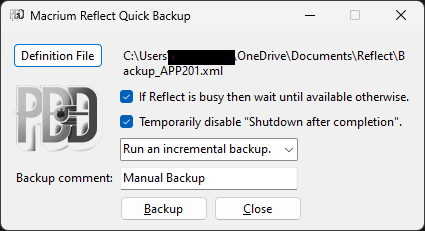
The settings speak for themself. At the first time you have to fill it in and it will be saved when you run the backup. The next time you only have to press the backup button.
Other
The installer will put a shortcut to the program in the startup folder of your PC and on the Desktop.
Only Macrium Reflect version 8.x is supported.
The software is freeware.
Windows Download
Click here to download the software
Support
You can report bugs or ask questions by sending an e-mail to me