Upload M3 API
Scope
This Excel sheet can be used to address the Infor M3 API’s.
Requirements
32 or 64 bits installation of Office 2013 or higher
MvxAPI toolkit from Infor
Session
When you open the Excel sheet you get a prompt to enter the settings. Below is a sample (please check you system administrator). The prompt will not save your password, so you have to enter your password for each session. All other settings are saved. The company/division settings are a little bit tricky. They override the user defaults and you must be aware of that especially if you work within multiple companies!
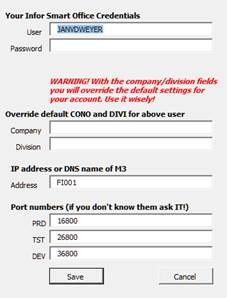
When you save the settings the data will be stored in the Windows registry. All the API data is collected from M3 and will be temporarily stored in the Data sheet in the Excel.
The Sheet
The first 3 rows define the API
Environment. You can use the dropdown box to select an Environment
API. You can enter the first characters of an API and the dropdown box will position to that, With the down arrow you can than select the desired transaction.
Max records. Output API’s can produce a lot of records. Default the maximum number of records M3 produces is 100. With this field you can increase or decrease the number of records M3 returns (max = 99999). It will only be effective for so called list/get API’s
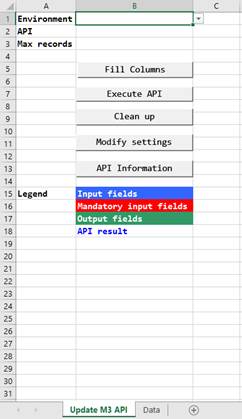
When you have entered at least the first twofields you can press the “Fill Columns” button. The sheet will gather all the input and output fields available. The result is similar like this:
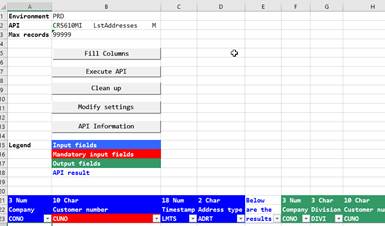
The input fields are in blue and if an input field is mandatory it will be red. After the input fields there is column that will show the message that the API returns. The green columns are the output fields.
After filling in the mandatory fields you can press the “Execute API” button. Below is an example:
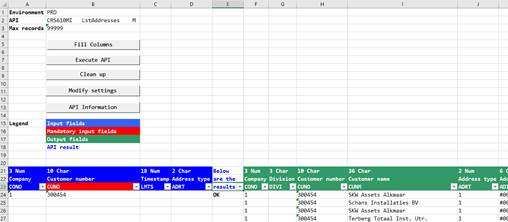
The “Clean up” button will remove all data on the sheet so you can start a new API request.
API Information
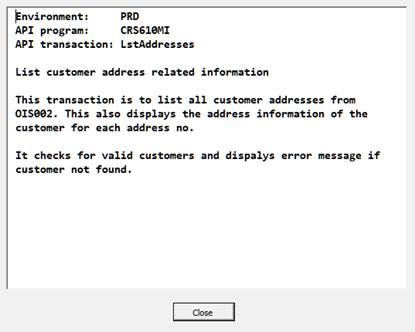
This screen will show you information about the selected API (if available):
Data sheet
Don’t touch this sheet in any way. If you do you may end up in a unworkable situation.
Windows Download
Upload M3 API V3.6, 32 and 64 Bits.xlsm
Support
You can report bugs or ask question by sending an e-mail to me